let’s connect



Your content ranks. Your backlinks check out. Yet traffic refuses to move. That disconnect almost always points to something buried in your site’s infrastructure.
A technical SEO checklist forces you to look where most teams don’t. Crawlability, indexability, site speed, structured data. When any of these break, everything built on top loses traction. And the damage compounds quietly.
This guide covers every item worth checking in a technical SEO audit for 2026. It’s organized by category so your team can execute systematically. At 2POINT, we start every engagement here because the biggest gains almost always live in the technical layer.
Key Takeaways
- Technical SEO factors determine whether search engines can crawl, index, and rank your content.
- Crawlability and indexing issues are the most common blockers in any seo technical checklist.
- Core Web Vitals and page speed directly affect rankings, especially on mobile.
- Structured data is essential for SERP features, AI Overviews, and rich results.
- Run a full technical SEO audit at least quarterly and after any major site change.
Crawlability and Indexing Checklist
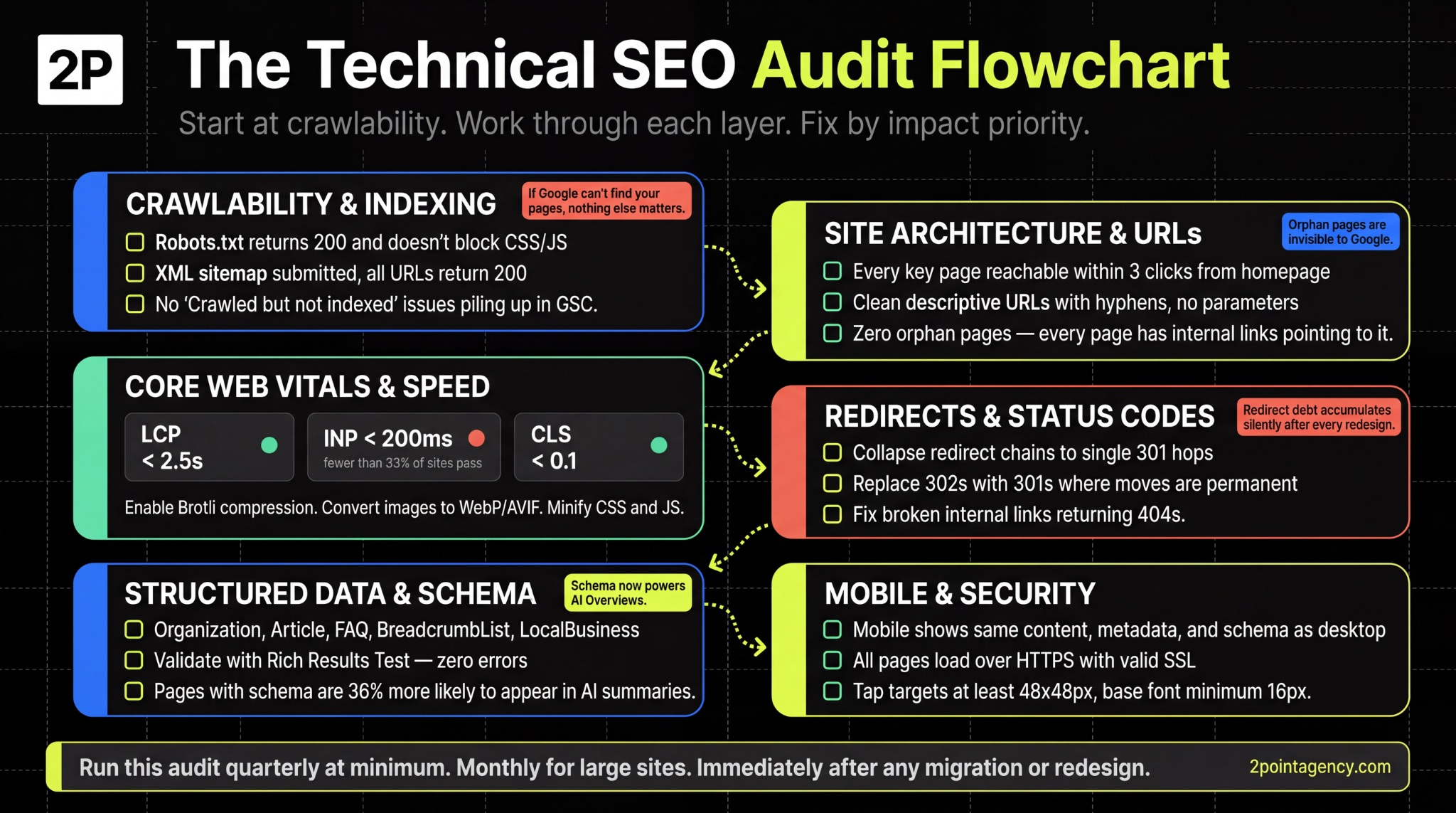
If Google can’t find your pages, nothing else you do matters. This is the most critical layer of any technical SEO audit checklist, and where you should start.
Robots.txt Configuration
Pull up yourdomain.com/robots.txt right now. If it returns a 404 or 5xx, Googlebot treats your entire site as open to crawl, burning budget on low-value pages like filters, staging URLs, or admin panels.
Start by confirming the file returns a 200 status code. Then check that you’re not blocking CSS or JavaScript files Google needs to render your content properly. You should also add your XML sitemap URL here so crawlers can discover your priority pages faster.
XML Sitemap Health
Your sitemap is a roadmap you hand to Google. If it includes dead ends or pages you don’t want found, you’re sending mixed signals that dilute crawl efficiency.
Make sure every URL in your sitemap meets these standards:
- Returns a 200 status code, is canonical, and is indexable.
- No noindexed, redirected, or 404 URLs cluttering the file.
- Large sites should use sitemap index files, keeping each under 50,000 URLs.
- Automate updates so new pages get added and removed pages get purged without manual work.
Index Coverage and Google Search Console
The Pages report in Search Console is your indexing diagnostic dashboard. Focus on pages labeled “Discovered but not indexed” or “Crawled but not indexed.” According to Google’s Search Console documentation, these statuses mean Google found the page but chose not to index it, typically due to thin content or duplicate signals.
Beyond that, look for “Duplicate without user-selected canonical” errors.
These indicate Google is choosing a canonical for you, which may not be the version you want ranking. Also monitor your Valid count regularly to confirm your priority pages are actually in the index.
Crawl Budget Optimization
Crawl budget only becomes a concern at scale. As Google’s documentation confirms, smaller sites rarely need to worry. But once you pass 10,000 pages, controlling where Googlebot spends time is critical.
The most common culprits that waste crawl budget include:
- Crawl traps like infinite pagination, faceted navigation, or session ID parameters.
- Low-value pages that should be blocked via robots.txt or noindex directives.
- Duplicate content paths spreading Googlebot across redundant URLs.
- Orphaned pages with no internal links pointing to them.
- Slow server response times that limit how many pages Googlebot can process per visit.
Site Architecture and URL Structure
URL Structure Best Practices
Your URLs tell both users and search engines what a page is about. Clean, descriptive paths like /blog/technical-seo-checklist/ outperform cryptic strings like /page?id=4827 every time.
Keep your URLs short by stripping unnecessary parameters, session IDs, and dynamic strings. You also want a logical hierarchy that mirrors your site’s content structure. For example, /services/technical-seo/ clearly signals topic and depth.
When you get this right, your pages become easier to crawl, share, and understand at a glance.
Site Depth and Navigation
Every important page on your site should be reachable within three clicks from the homepage.
The deeper you bury a page, the less frequently Googlebot crawls it, and the less authority it receives through internal linking.
To uncover issues, audit your navigation menus, breadcrumbs, and footer links for gaps. Pay special attention to orphan pages with zero internal links pointing to them. These are essentially invisible to Google because there’s no path for crawlers to follow.
Even strong content won’t rank if search engines can’t reach it, so making your site structure shallow and well-connected should be an ongoing priority.
Internal Linking Architecture
Internal links distribute authority across your site. This is why building topical authority through content clusters depends heavily on intentional linking patterns between related pages.
To make your internal links work harder, focus on these areas:
- Use descriptive anchor text that tells Google what the target page covers, not vague phrases like “learn more” or “click here.”
- Audit pages with zero or few internal links, then weave in contextual connections from relevant content.
- Implement hub-and-spoke or pillar-cluster models so related pages reinforce each other’s relevance.
- Review your top-performing pages and ensure they link down to supporting content that needs visibility.
- Check for broken internal links regularly, as these waste equity and create dead ends for both crawlers and users.
Page Speed and Core Web Vitals
Your site’s speed directly affects how Google evaluates user experience.
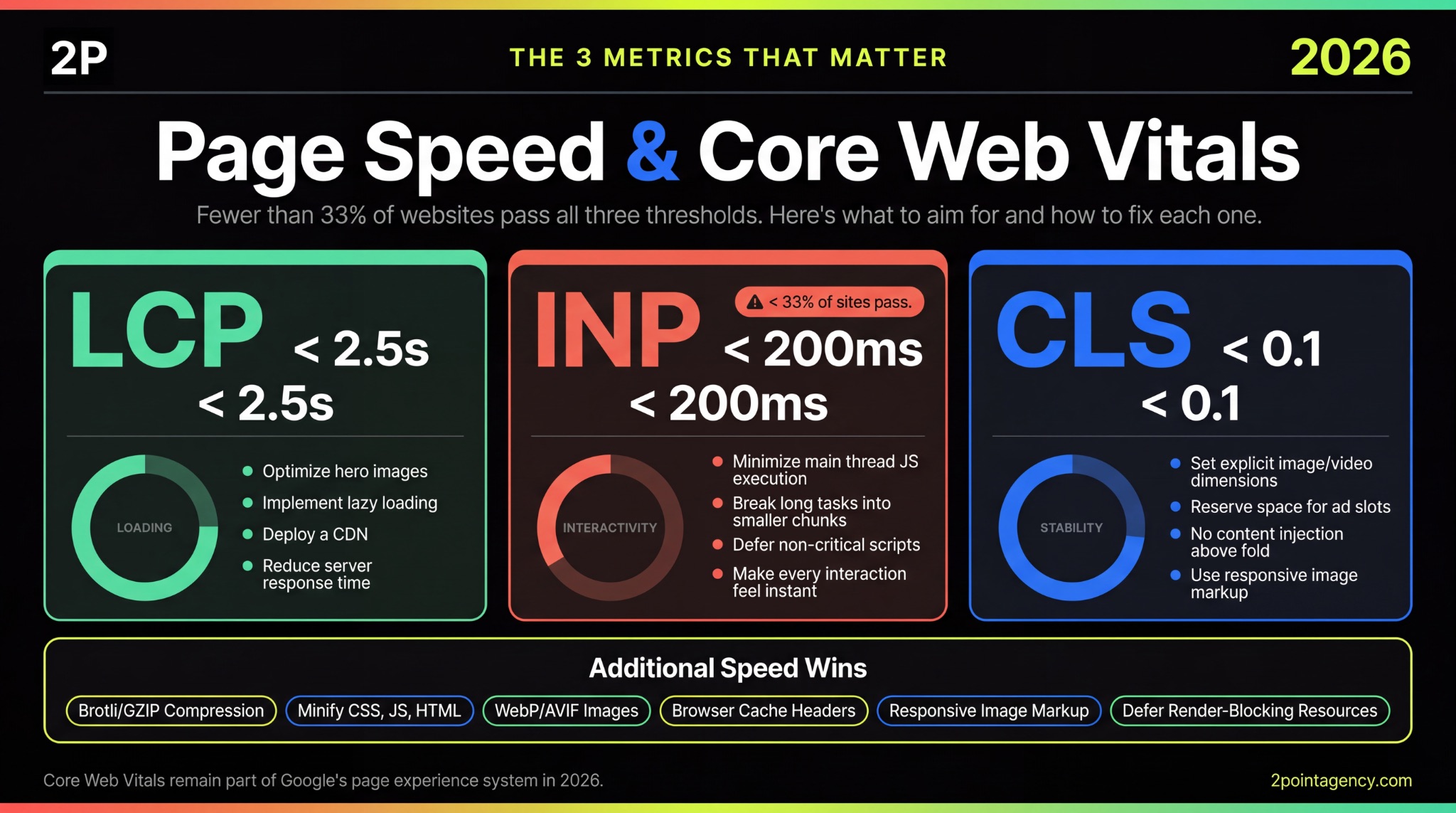
According to Google’s Core Web Vitals documentation, these metrics remain part of the page experience system in 2026. The thresholds haven’t shifted since INP replaced FID in March 2024, so you already know what to aim for.
Largest Contentful Paint (LCP)
Your LCP score tells you how long users wait to see the main content on your page. The target is under 2.5 seconds, and you can check where you stand by auditing your top landing pages using PageSpeed Insights and Chrome UX Report.
If you’re falling short, focus on these common fixes:
- Optimize hero images so the largest visible element loads faster.
- Implement lazy loading for below-the-fold content that doesn’t need to render immediately.
- Deploy a CDN to reduce latency for users far from your origin server.
- Improve server response time, which directly controls how quickly the page begins rendering.
Even one of these changes can move you closer to the threshold, so start with whichever has the biggest gap.
Interaction to Next Paint (INP)
While LCP covers loading speed, INP measures how quickly your page responds when users click, tap, or type. The target is under 200 milliseconds. According to NitroPack’s Core Web Vitals report, fewer than 33% of websites pass all three CWV thresholds, and INP is where most sites struggle.
To improve your score, minmize JavaScript execution on the main thread, break up long tasks into smaller chunks, and defer non-critical scripts.
The goal is making every interaction feel instant to the user, not just the first one.
Cumulative Layout Shift (CLS)
Once your page loads fast and responds quickly, the next thing to protect is visual stability. CLS measures how much your page shifts while loading.
The target is under 0.1. If you’ve ever seen content jump as ads or images load in, that’s exactly what this metric captures.
To fix it, set explicit width and height dimensions on all images and videos. You should also reserve space for ad slots before they render, and avoid injecting new content above elements already visible on screen.
These adjustments are small but directly impact how stable your pages feel to users.
Additional Speed Optimizations
Beyond Core Web Vitals, there are general speed improvements that support all three metrics.
These won’t move any single score dramatically on their own, but together they create a faster baseline for everything else:
- Enable Brotli or GZIP compression to reduce file sizes during transfer.
- Minify your CSS, JavaScript, and HTML to strip out unnecessary code.
- Convert images to WebP or AVIF for smaller files without losing visual quality.
- Use responsive image markup so mobile devices aren’t forced to download desktop-sized assets.
Mobile Optimization
Mobile-First Indexing Compliance
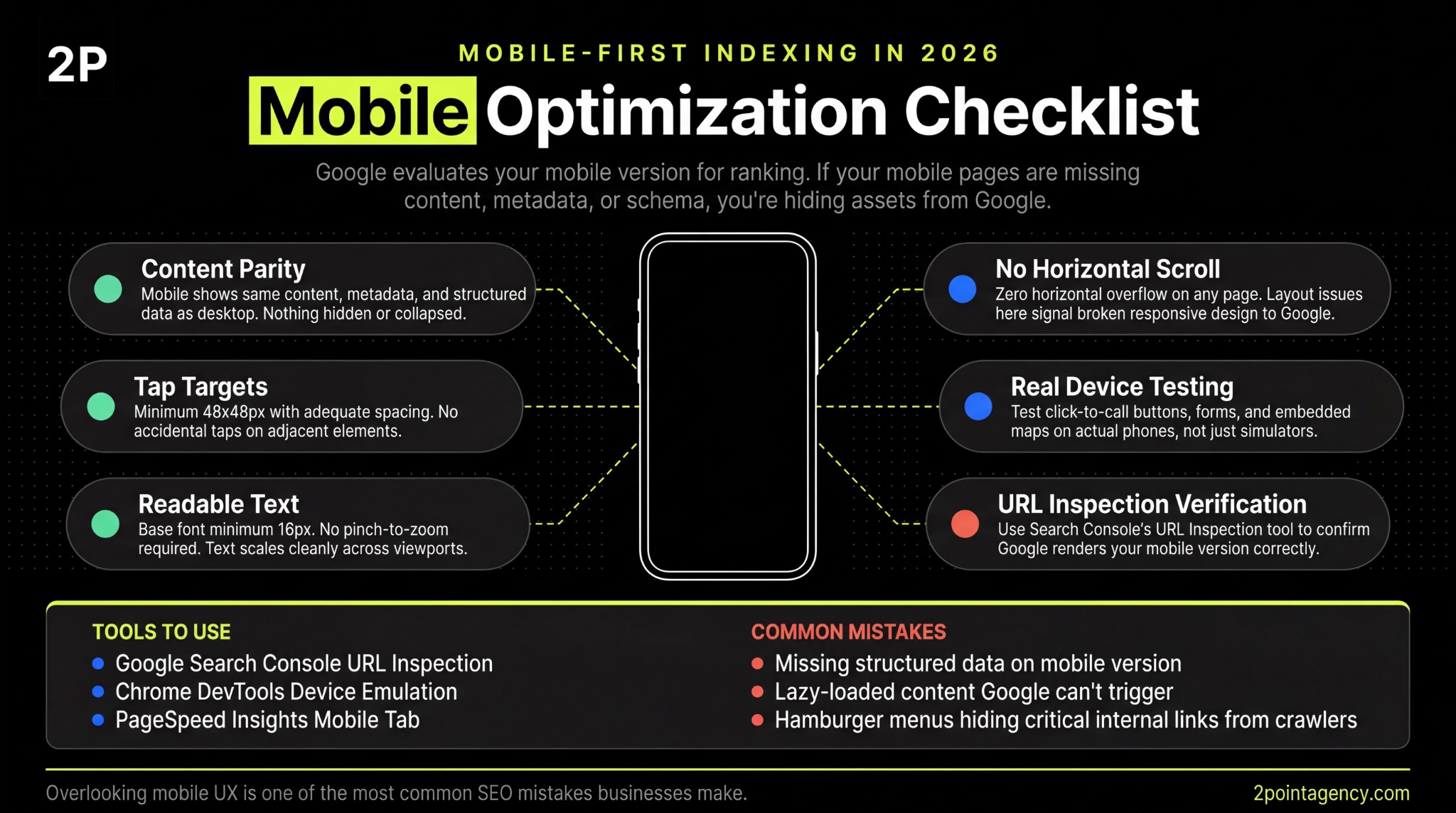
Google uses mobile-first indexing, which means the mobile version of your site is what gets evaluated for ranking. If your mobile pages are missing content, metadata, or structured data that exists on desktop, you’re essentially hiding assets from Google.
To catch these gaps, use the URL Inspection tool in Search Console to see exactly how Google renders your mobile pages. Beyond that, test in Chrome DevTools device emulation and on actual devices to confirm everything displays correctly across screen sizes.
Mobile UX Essentials
Even if your mobile content matches desktop, poor usability can still hurt you.
Start with tap targets, which should be at least 48×48 pixels with adequate spacing so users aren’t accidentally hitting the wrong element. From there, check that your body text uses a minimum 16px base font to stay readable without zooming.
You also want to confirm there’s no horizontal scrolling on any page, as this signals a layout issue Google can flag.
Once the basics are in place, test click-to-call buttons, forms, and embedded maps on real phones rather than simulators alone. When you look at the most common SEO mistakes businesses make, overlooking mobile UX consistently sits near the top of the list.
HTTPS and Security
Every page on your site should load over HTTPS with a valid, unexpired SSL certificate. If any page still serves HTTP resources, you’ll trigger mixed content warnings that browsers flag to users, which erodes trust immediately.
Your HTTP-to-HTTPS redirects also need to use 301 status codes so link equity passes correctly. Make sure your certificate covers all subdomains too, not just your root domain.
From there, implement HSTS headers to prevent browsers from ever loading an insecure version of your pages.
Structured Data and Schema Markup
Schema markup has become a genuine visibility factor, and it’s one you should prioritize in any website technical SEO audit.
Reporting by Search Engine Land on schema and AI Overviews confirmed that both Google and Microsoft now use structured data in their generative AI features. This means your schema directly influences whether your content appears in AI-generated answers, not just traditional search results.
Among the technical SEO factors that impact discoverability, this one is gaining weight fast. Make sure it’s on your site audit checklist.
Essential Schema Types
Once you’ve committed to structured data, make sure you’re covering the schema types that matter most for your pages:
- Organization on your homepage with name, logo, URL, and social profiles.
- LocalBusiness for any physical locations you operate.
- Article or BlogPosting on content pages with author, datePublished, and dateModified.
- BreadcrumbList for breadcrumb navigation.
- FAQ on pages with question-and-answer content.
- Product and Review for e-commerce pages.
Schema Validation and Testing
After implementing your schema, you need to verify it’s working correctly. This step is easy to skip but essential in any technical SEO audit:
- Validate markup using Google’s Rich Results Test and Schema.org validator.
- Check the Enhancements section in Search Console for errors or warnings.
- Audit schema across your page templates to ensure site-wide consistency.
Schema for AI Visibility
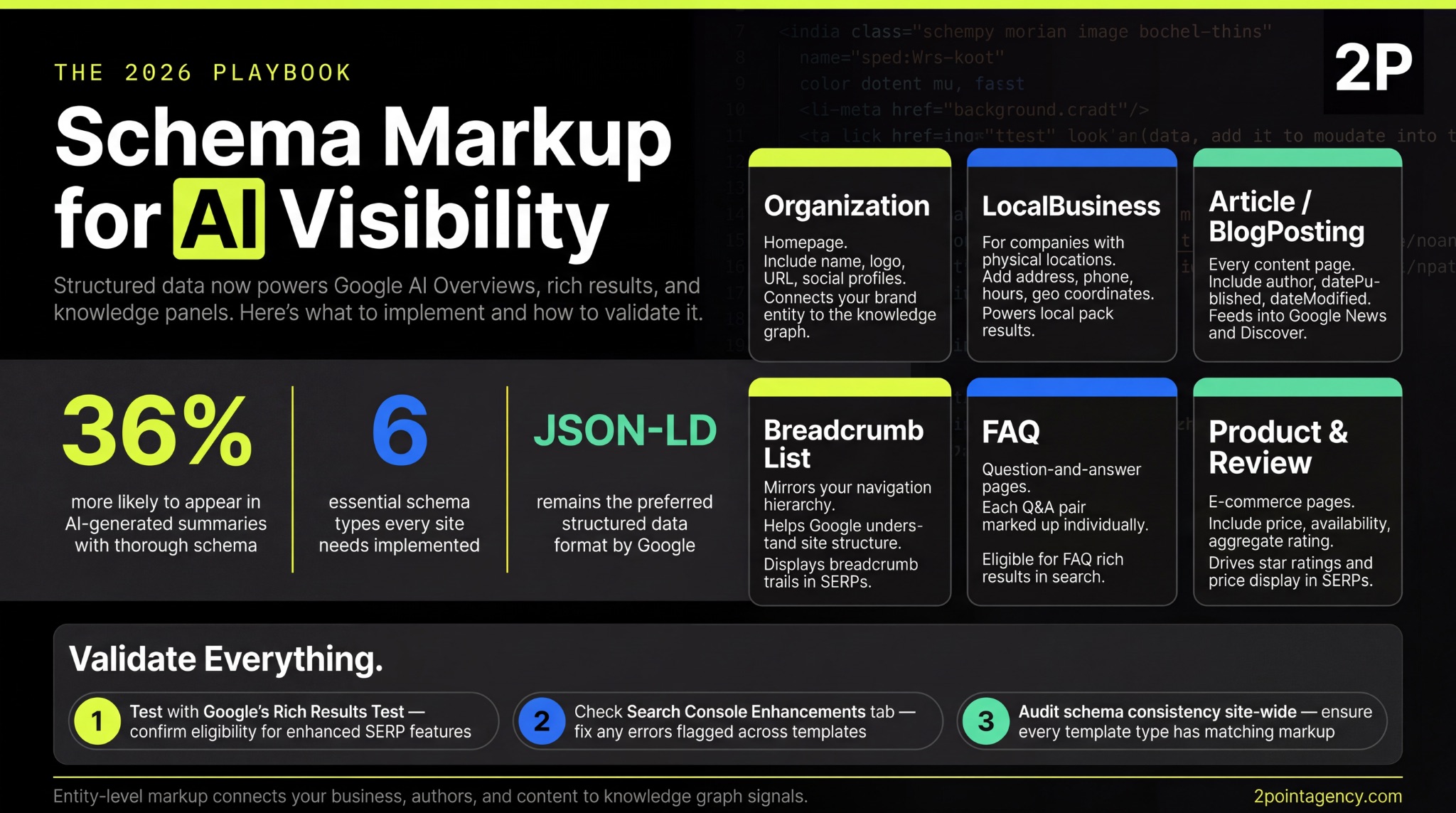
Structured data now plays a direct role in whether your content surfaces in AI-generated answers. Research from Schema App on AI search and structured data confirms that both Google and Microsoft use schema markup in their generative AI features, making it far more than a rich results tactic.
To take advantage of this, focus on entity-level markup that connects your business, authors, and content to knowledge graph signals. These connections help AI systems understand your authority and relevance. JSON-LD remains the preferred format for implementation.
Redirects and HTTP Status Codes
Redirect issues are sneaky technical SEO factors that accumulate silently.
You redesign a section, update some slugs, or migrate a subdomain, and suddenly your site has redirect chains three hops deep. To clean this up, focus on these areas:
- Audit redirect chains and collapse them so each points directly to the final URL.
- Replace 302 temporary redirects with 301s where the move is permanent.
- Fix broken internal links returning 404 errors before they spread.
- Build a custom 404 page that guides users to useful content instead of a dead end.
- Monitor soft 404s in Search Console where pages return a 200 status but display error content.
Canonicalization and Duplicate Content
Once your redirects are clean, the next thing to check is how you’re handling duplicate content. Every page should have a self-referencing canonical tag or point to the preferred version. Without this, Google decides for you.
Watch for conflicting signals where your canonical says one URL but your sitemap lists another.
You should also standardize trailing slashes, www vs. non-www, and HTTP vs. HTTPS across your entire site. For near-duplicate pages, either consolidate them or differentiate meaningfully so Google knows which version to prioritize.
Rendering and JavaScript SEO
JavaScript-heavy sites face a unique challenge. Google’s rendering queue can take days to process JS content, which means critical pages may sit unindexed longer than you’d expect. Connecting your SEO tools into an integrated tech stack helps you automate rendering checks before problems snowball.
To stay ahead, test your pages with the URL Inspection tool’s “View Rendered HTML” feature and verify that JavaScript-rendered content actually appears in the output.
You should also audit content hidden behind tabs or accordions, as these often require interaction to display. If client-side rendering is causing indexing gaps, consider implementing server-side rendering or dynamic rendering for your JS-heavy frameworks.
Log File Analysis
Server logs show you what Googlebot actually does on your site, not predictions from tools, but ground truth. This data is invaluable for any thorough seo technical checklist because it reveals gaps you can’t see anywhere else.
When reviewing your logs, focus on these key areas:
- How Googlebot’s actual crawl patterns compare to your assumptions.
- Which pages get frequent visits versus which ones get ignored entirely.
- Excessive crawling of low-value pages, 5xx errors, or slow server response times.
- Whether crawl frequency for your priority pages aligns with what your sitemap declares.
International SEO Technical Setup
If your site targets multiple languages or regions, hreflang tells Google which version to serve where. Get it wrong and you end up competing against yourself in the SERPs.
To avoid that, implement hreflang annotations using ISO 639-1 language codes and ISO 3166-1 Alpha-2 region codes. Every tag must be reciprocal, meaning if Page A references Page B, then Page B must reference Page A back.
You also need to choose a URL structure that fits your setup, whether that’s subdirectories, subdomains, or ccTLDs.
As outlined in Google’s hreflang documentation, reciprocal links and the x-default tag are the two elements most commonly misconfigured. Audit for conflicts between hreflang and canonical tags regularly to keep everything aligned.
How Often to Run a Technical SEO Audit
A site audit checklist is not a one-time project. Technical debt builds faster than most teams realize, so you need a consistent schedule to catch issues early:
- Quarterly as a baseline for most websites.
- Monthly for large, frequently updated, or e-commerce sites.
- Immediately after redesigns, migrations, CMS changes, or major algorithm updates.
- Continuously between full audits using Search Console and speed dashboards.
Staying ahead of evolving SEO trends and algorithm shifts means building audits into your workflow rather than treating them as one-off tasks.
How 2POINT Approaches Technical SEO Audits
At 2POINT, we treat technical SEO as the non-negotiable foundation of every engagement.
Every client starts with a comprehensive technical SEO audit that maps crawl errors, indexing gaps, speed issues, and schema gaps before any content or link building begins.
From there, structured reporting breaks findings into critical, high, medium, and low priority so your team knows exactly what to fix first. Ongoing monitoring then catches issues early, before they turn into ranking drops. That depth of technical oversight is one of the biggest differences when choosing between DIY SEO and hiring professionals.
Explore our SEO services to see how we approach it.
Is Your Technical Foundation Holding You Back?
Technical SEO is what everything else rests on. Content, links, and brand authority all underperform when the infrastructure has cracks.
Use this technical seo checklist to audit your site systematically, prioritize fixes by impact, and build a cadence that keeps problems from stacking up. If you want expert eyes on your site, get in touch with 2POINT to see where your biggest technical opportunities are hiding.
FAQs About Technical SEO
What is a technical SEO checklist?
A technical SEO checklist is a structured framework that covers crawlability, indexing, speed, schema, and site architecture. It helps you systematically find and fix the issues preventing search engines from properly crawling, rendering, and ranking your content.
How often should I do a technical SEO audit?
Run a website technical SEO audit quarterly at minimum. Large or frequently updated sites benefit from monthly reviews. You should also run an immediate audit after any redesign, migration, CMS change, or major algorithm update to catch new issues early.
What are the most important technical SEO factors in 2026?
The top factors include crawlability, Core Web Vitals, structured data for AI visibility, mobile-first compliance, clean URL architecture, and proper canonicalization. A thorough technical SEO audit checklist should cover each of these areas to keep your site competitive.
Can technical SEO issues hurt my rankings?
Yes. Crawl errors, slow page speeds, broken redirects, and missing schema all suppress rankings silently. These problems often stay hidden while your content and link building efforts fail to gain traction, which is why a regular site audit checklist matters.
Do I need a developer to fix technical SEO issues?
Basic fixes like meta tags and sitemap updates are manageable without a developer. However, deeper issues involving server configuration, JavaScript rendering, or advanced schema implementation typically require development support to resolve properly and avoid introducing new problems.