


 let’s connect


Google doesn't crawl every page every day. On large websites with tens of thousands of URLs, that matters. The pages Googlebot skips don't get indexed, updated, or ranked. Most teams never realize it's happening.
SEO crawl budget is the mechanism behind how Google allocates crawling resources across your site. When those resources get wasted on low-value URLs, the pages driving revenue get neglected.
This guide covers how to diagnose crawl budget problems, fix common offenders, and implement crawl budget optimization so Googlebot focuses where it counts.
At 2POINT, we include this in every technical audit because the impact is massive.
Key Takeaways
- SEO crawl budget is the number of pages Googlebot will crawl on your site in a given period, driven by crawl rate limit and crawl demand.
- It matters most for large sites with 10,000+ pages, e-commerce catalogs, and sites with heavy faceted navigation.
- The biggest wasters are duplicate content, redirect chains, parameter URLs, soft 404s, and orphan pages.
- Crawl budget optimization means directing Googlebot toward high-value pages and away from resources that don't contribute to rankings.
- Your primary levers for crawl budget SEO include server speed, XML sitemap hygiene, internal linking, and robots.txt configuration.
What Is Crawl Budget and Why It Matters
How Google Defines Crawl Budget
To optimize your crawl budget, you first need to understand how Google calculates it.
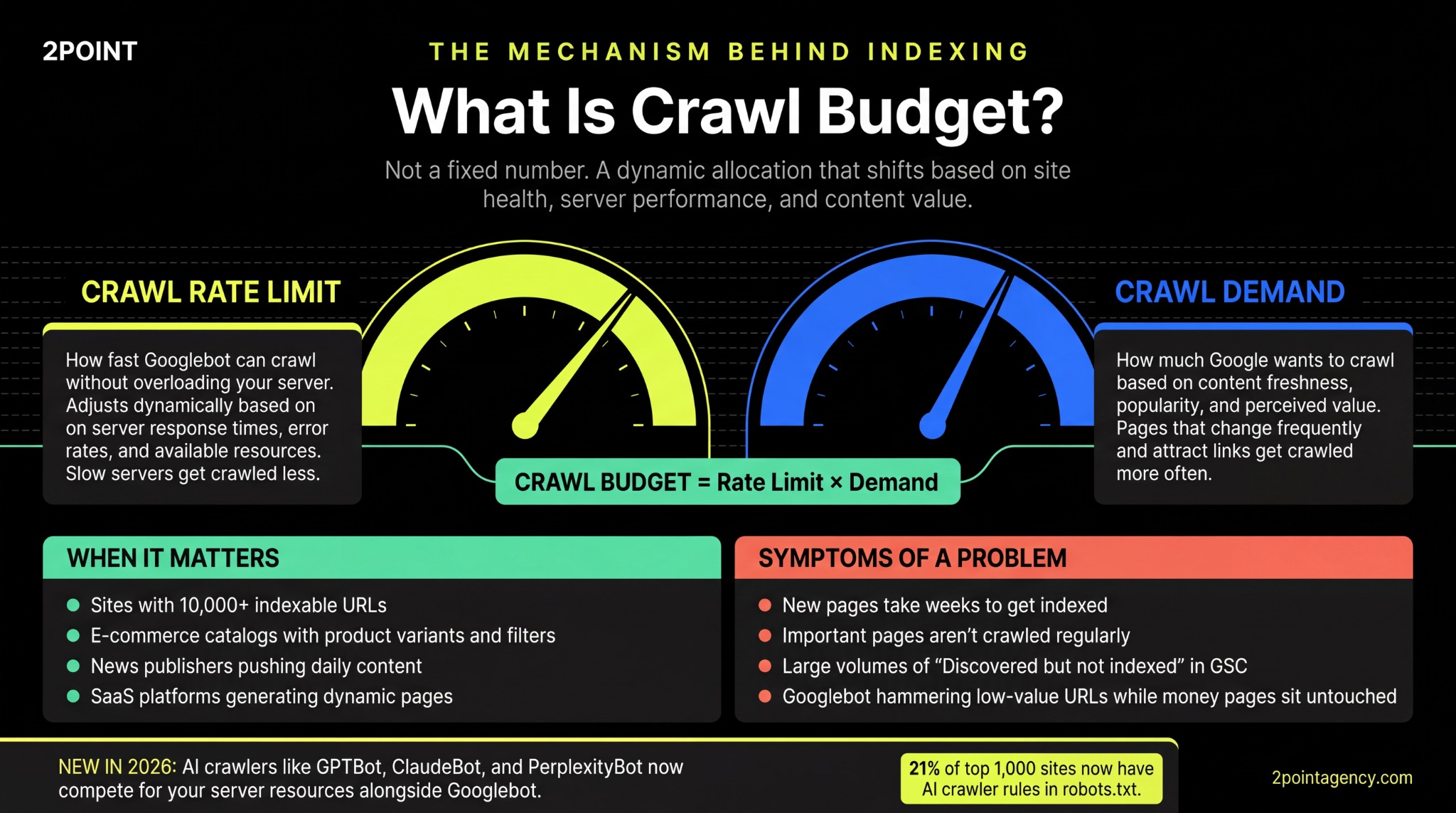
According to Google's crawl budget documentation, crawl budget isn't a fixed number. It's a dynamic allocation that shifts based on your site's health, server performance, and how valuable Google considers your content.
Two components drive this allocation:
- Crawl capacity limit controls how fast Googlebot can crawl without overloading your server, adjusting dynamically based on response times and error rates.
- Crawl demand determines how much Google actually wants to crawl based on content popularity, freshness, and perceived value.
Together, these signals dictate how many pages Googlebot visits and how often it returns to check for updates.
When Crawl Budget Becomes a Problem
Not every site needs to worry about crawl budget SEO. If you have a few hundred pages, Google can process them fully in a single session.
The real pain starts once you cross 10,000+ indexable URLs, and it gets severe for e-commerce sites with product variants, news publishers pushing daily content, SaaS platforms generating dynamic pages, and marketplaces with user-generated listings.
If any of these sound familiar, you likely have a crawl budget problem:
- New pages take weeks to get indexed.
- Important pages aren't being crawled regularly.
- Google Search Console shows large volumes of "Discovered but not indexed" or "Crawled but not indexed" URLs.
Crawl Budget and AI Crawlers in 2026
Beyond Googlebot, you now have AI crawlers competing for your server resources too. Bots like GPTBot, ClaudeBot, and PerplexityBot are requesting pages from websites at scale.
As reported in Paul Calvano's analysis of AI bots and robots.txt, nearly 21% of the top 1,000 websites already have specific rules for AI crawlers in their robots.txt files. These bots consume bandwidth and compete with Googlebot for server capacity, adding a new layer to your crawl budget management that didn't exist two years ago.
How to Diagnose Crawl Budget Problems
Google Search Console Crawl Stats
The first place to diagnose crawl budget issues is your Crawl Stats report in GSC. It shows total crawl requests, average response time, and activity by file type.
What you're looking for are patterns.
Specifically, whether Googlebot is burning most of its sessions on low-value parameter URLs while your key pages sit untouched. If so, that's the clearest sign of crawl waste.
Once you've identified those patterns, cross-reference them with the Pages report. Large numbers of "Discovered but not indexed" URLs mean Google knows about your pages but hasn't allocated enough resources to process them.
Together, these two reports give you a clear picture of where your SEO integrations and technical stack need attention.
Server Log File Analysis
While Search Console shows you summaries, server log files give you the raw data. They reveal exactly which pages Googlebot requests, how often it returns, and what responses it receives.
To put this data to work, compare crawled URLs against your priority pages.
If you find Googlebot hammering parameter URLs and paginated archives more than your money pages, that's a clear signal your crawl budget is being misallocated. This is where optimization decisions start becoming actionable.
Site Crawler Audits
Log files show you what Googlebot is doing, but a full site crawl shows you why.
Tools like Screaming Frog or Sitebulb let you map your entire URL structure and compare how many crawlable URLs exist versus how many you actually want indexed.
During this audit, flag the pages eating resources unnecessarily. Duplicates, redirect chains, orphan pages, and thin content are the usual culprits. After identifying them, you have a clear cleanup list to start working from.
The Biggest Crawl Budget Wasters
Faceted Navigation and Parameter URLs
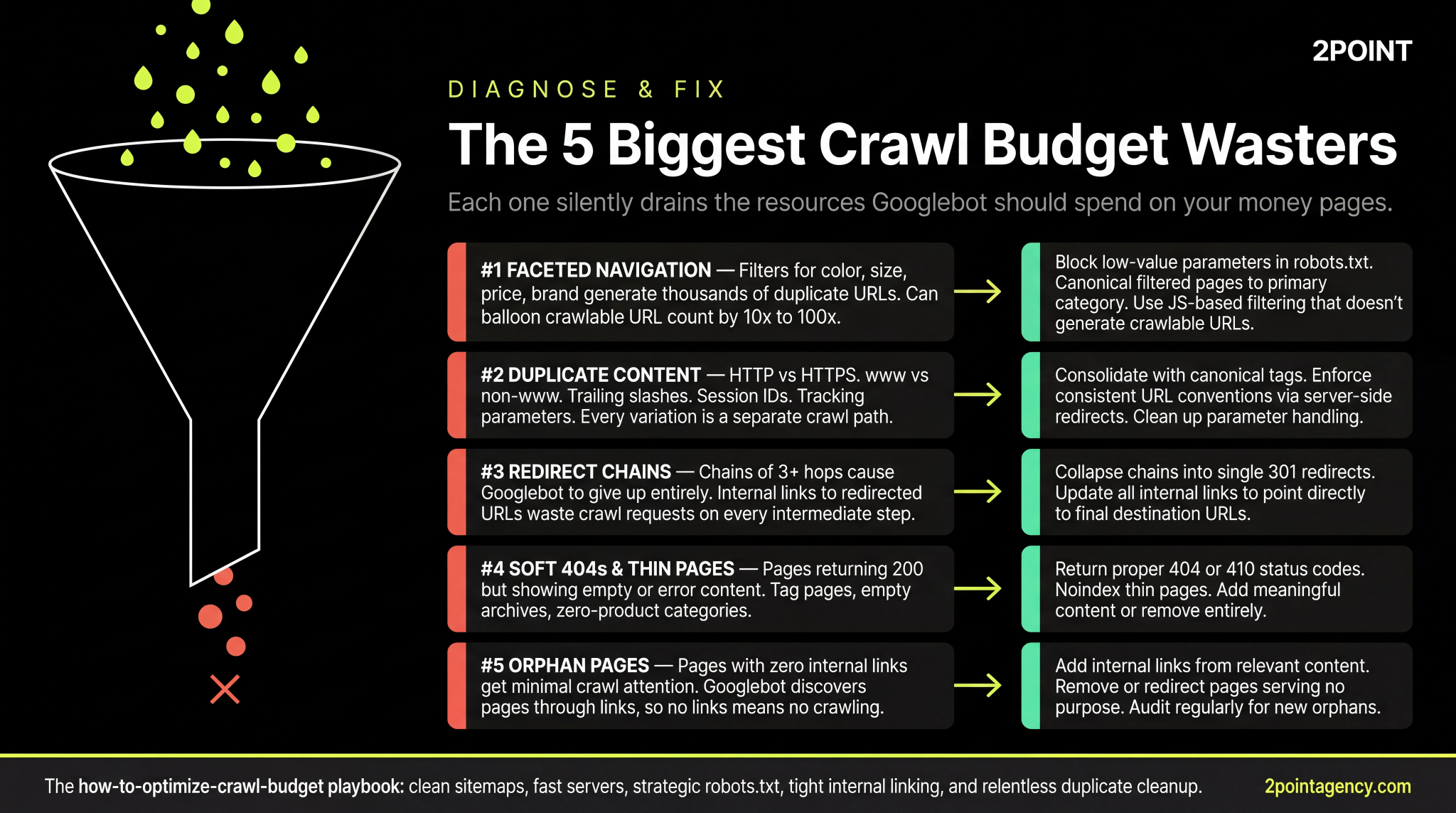
This is the single largest crawl budget killer on e-commerce sites. Filters for color, size, price, brand, and sort order can generate thousands or even millions of unique URL combinations.
Each one looks like a separate page to Googlebot, which means your crawlable URL count can balloon dramatically if left unchecked. As Search Engine Land's guide on faceted navigation explains, this creates index bloat, duplicate content, and crawl inefficiency that directly undermines your most important pages.
To fix this, you have several options:
- Block low-value parameter combinations in robots.txt.
- Apply canonical tags on filtered pages pointing to the primary category URL.
- Use JavaScript-based filtering that doesn't generate crawlable URLs.
Duplicate and Near-Duplicate Content
Faceted navigation isn't the only source of URL bloat.
Your site may also be generating duplicates through HTTP vs. HTTPS, www vs. non-www, trailing slash variations, session IDs, and tracking parameters from email campaigns. Every variation creates a separate crawl path Googlebot has to process, and together they drain resources silently.
These are among the most common SEO mistakes on large websites and often go unnoticed until indexing issues appear.
To fix this, consolidate with canonical tags, enforce consistent URL conventions through server-side redirects, and clean up your parameter handling so Googlebot stops wasting time on pages that shouldn't exist.
Redirect Chains and Loops
When Googlebot hits a redirect chain of three or more hops, it often gives up before reaching the final URL. That means the page you actually want indexed may never get crawled. Internal links pointing to redirected URLs make this worse by wasting crawl requests on every intermediate step.
To fix this, update your internal links to point directly to final destinations and collapse chains into single 301 redirects. A quick crawl audit will surface the worst offenders.
Soft 404s and Low-Value Pages
Some pages look fine to users but send confusing signals to Googlebot.
Soft 404s return a 200 status code while displaying empty or error content, which wastes budget and muddles your quality signals. The most common culprits include:
- Tag pages with little or no unique content.
- Empty author archives that serve no user purpose.
- Zero-product category pages left over from inventory changes.
For these, you can return proper 404 or 410 codes, apply noindex directives, or add meaningful content that justifies their existence in your index.
Orphan Pages and Dead Ends
Googlebot discovers pages through links. If a page has zero internal links pointing to it, crawlers have no path to reach it, regardless of how valuable the content might be.
To address this, audit for orphan pages and connect them to relevant content through contextual internal links. If they don't serve a purpose, remove or redirect them so they stop occupying space in your index without contributing anything.
How to Optimize Crawl Budget
Improve Server Response Time
Googlebot adjusts how aggressively it crawls your site based on how fast your server responds.
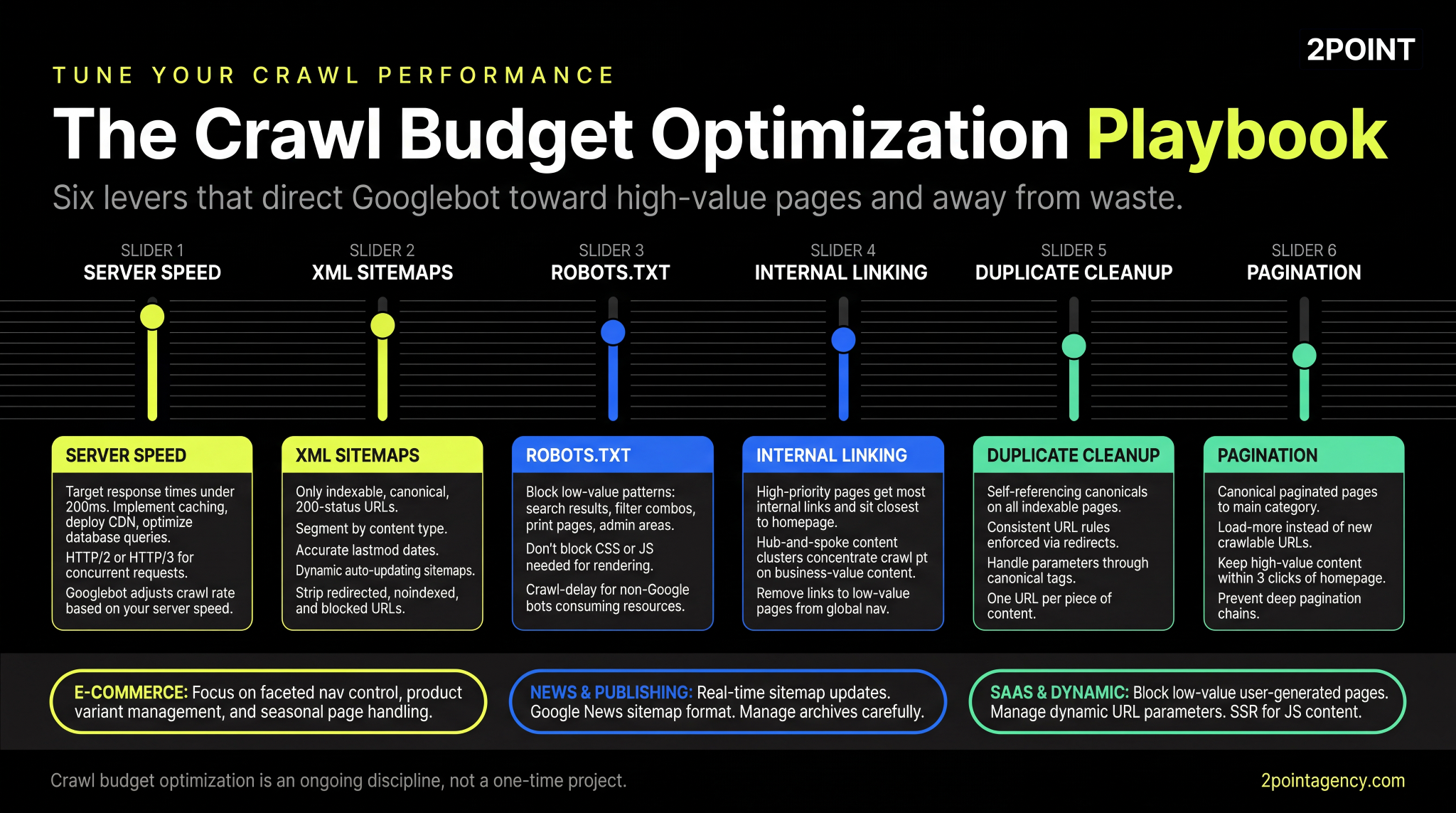
Slow servers get crawled less, which directly limits your crawl budget SEO performance. Your target should be response times under 200 milliseconds.
To reach that threshold, implement caching, deploy a CDN, and optimize your database queries. On top of that, upgrading to HTTP/2 or HTTP/3 allows concurrent requests, letting Googlebot process more pages per session without overloading your server.
Optimize XML Sitemaps
A fast server gets Googlebot to your pages quicker, but your sitemap determines which pages it prioritizes. Every URL in your sitemap should be indexable, canonical, and return a 200 status.
Strip out anything redirected, noindexed, or blocked by robots.txt.
For large sites, go a step further and segment your sitemaps by content type so you can track crawl performance per section. Products in one file, blog posts in another, category pages in a third.
Also make sure you're using accurate lastmod dates and dynamic sitemaps that update automatically when content changes. This kind of sitemap hygiene is one of the fastest ways to improve crawl budget optimization without touching a single line of code.
Strategic robots.txt Management
While your sitemap tells Googlebot where to go, your robots.txt tells it where not to. Use it to block crawling of low-value patterns like internal search results, filter combinations, print pages, and admin areas.
That said, be careful not to block CSS or JavaScript files Googlebot needs for rendering, as this can prevent your pages from being processed correctly. And for non-Google bots consuming excessive server resources, crawl-delay directives can throttle their activity without affecting your SEO crawl budget.
Fix Internal Linking Architecture
Robots.txt controls where Googlebot can't go, but your internal linking structure controls where it's most likely to go. High-priority pages should receive the most internal links and sit closest to the homepage in site depth.
At the same time, remove or nofollow links to low-value pages from your global navigation so you're not funneling crawl attention toward pages that don't matter.
Building topical authority through hub-and-spoke content clusters takes this further by concentrating crawl paths on the content that drives business value, making it easier for Googlebot to find and revisit your most important pages.
Consolidate Duplicate Content
With your internal linking cleaned up, the next step is making sure Googlebot isn't wasting time on duplicate versions of the same page. To prevent this, focus on these areas:
- Add self-referencing canonical tags on all your indexable pages.
- Enforce consistent URL rules across your site: www or non-www, trailing slash or not, and redirect all variations.
- Handle URL parameters through canonical tags or Search Console parameter settings.
Manage Pagination Efficiently
Even with duplicates consolidated, deep pagination chains can bury your content beyond what Googlebot will ever reach. If your paginated category pages stretch dozens of pages deep, crawlers may never get to the products listed at the end.
To address this, point paginated pages back to the main category with rel=canonical, or implement load-more functionality that doesn't generate new crawlable URLs. Most importantly, keep your high-value products and content within three clicks of the homepage so crawlers can reach them without navigating through endless pagination.
Crawl Budget Optimization by Site Type
E-Commerce Sites
Pagination fixes are important, but e-commerce sites face crawl budget challenges that go well beyond pagination. Faceted navigation control, product variant management, and seasonal page handling all demand attention.
An e-commerce site with 50,000 products and uncontrolled filtering can easily generate 5 million crawlable URLs.
To stay ahead, prioritize your category pages and top-selling products in both your sitemap and internal linking. Understanding how eCommerce SEO differs from enterprise and local helps you focus your crawl budget optimization tactics on the areas that matter most for your business model.
News and Publishing Sites
If you're publishing time-sensitive content, your crawl budget challenges look different.
Real-time sitemap updates are critical, and you should use Google's News sitemap format so fresh stories get discovered immediately.
At the same time, manage your archive pages carefully.
Years of old content can consume the crawl budget you need for breaking stories. Knowing how to repurpose evergreen content across platforms can reduce the volume of thin archive pages competing for crawl attention, keeping Googlebot focused on what's current.
SaaS and Dynamic Platforms
SaaS products introduce yet another layer of complexity.
User-generated pages, dynamic URL parameters, and JavaScript-rendered content all create crawl budget pressure if left unmanaged. To regain control, focus on these priorities:
- Block low-value user-generated pages from crawling entirely.
- Manage dynamic URL parameters aggressively through robots.txt and canonical tags.
- Ensure JavaScript-rendered content is accessible to Googlebot without excessive render requests.
- Implement server-side rendering or dynamic rendering if client-side rendering is causing indexing gaps.
Getting these right eliminates the disconnect between what your users see and what Googlebot actually indexes.
Monitoring and Maintaining Crawl Health
Fixing crawl budget issues is only half the work. Without ongoing monitoring, new problems will surface every time you update your site, push new content, or run a migration.
To keep your crawl budget SEO in check, build these habits into your workflow:
- Set up weekly or bi-weekly crawl stat monitoring in Google Search Console.
- Run quarterly log file analyses to validate Googlebot behavior against your expectations.
- Track indexation rates by comparing submitted URLs versus actually indexed URLs over time.
- Monitor for crawl anomalies after site updates, migrations, or major content changes.
- Configure automated alerts for sudden drops in crawl activity or server error spikes.
Staying ahead of evolving SEO trends and technical shifts means treating crawl health as an ongoing discipline, not a one-time crawl budget optimization project.
How 2POINT Approaches Crawl Budget Optimization
At 2POINT, we include crawl budget analysis in every technical SEO audit because for large sites, it's one of the highest-impact areas we can address. Our process starts with a full crawl audit that maps your total URL footprint, identifies waste, and spots where Googlebot's attention is misaligned with your priorities.
Log file analysis then reveals how Googlebot actually interacts with your site.
From there, we build a prioritized action plan so your team knows what to fix first, and ongoing monitoring ensures improvements stick as your site evolves.
For a broader view of technical fundamentals, our technical SEO checklist covers every layer beyond crawl budget. Explore our SEO services to see how we approach crawl budget optimization for large sites.
Stop Wasting Googlebot's Time on Pages That Do Not Matter
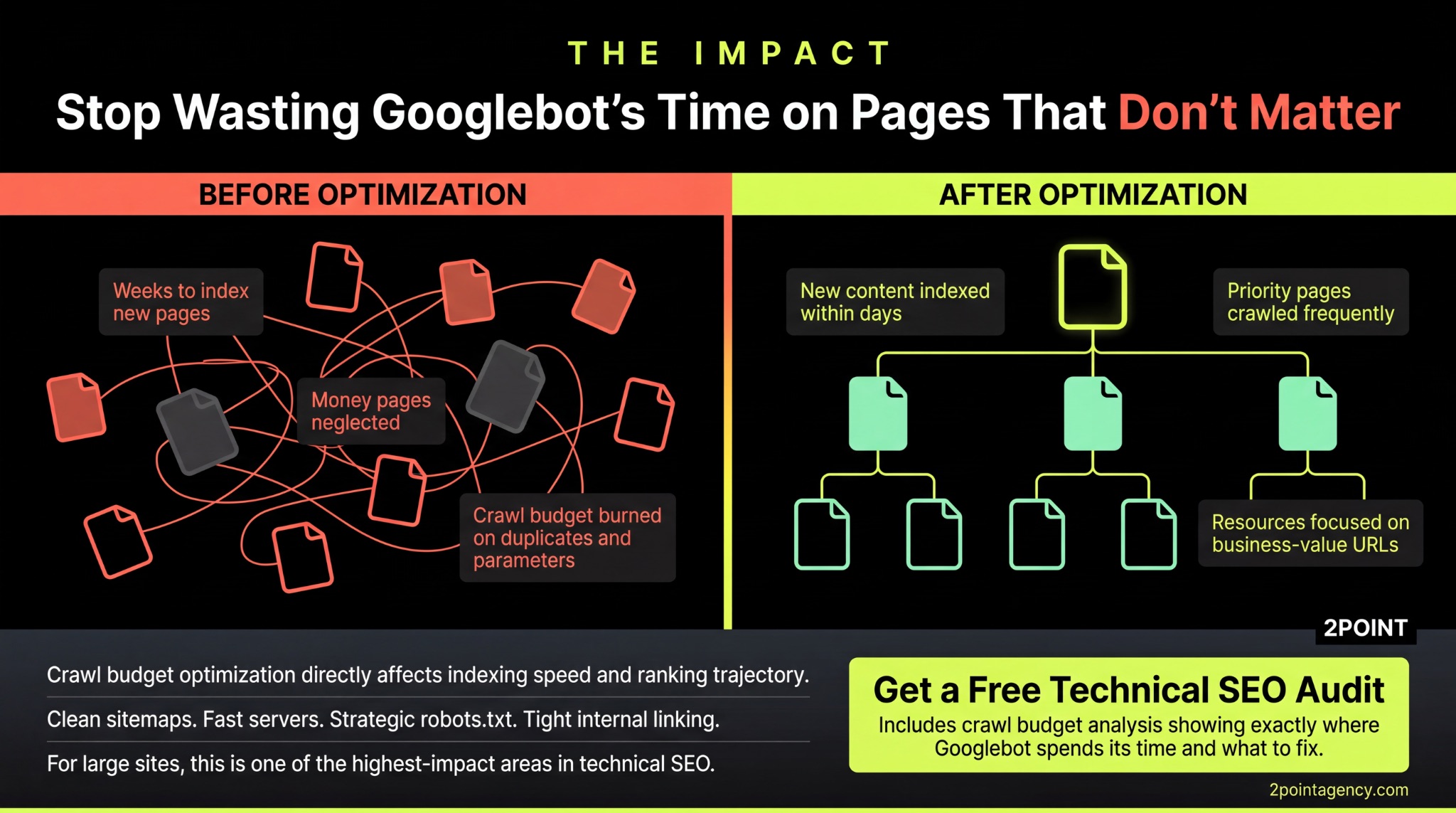
SEO crawl budget optimization directly affects how quickly your content gets indexed and how well you compete in search. Clean sitemaps, fast servers, strategic robots.txt rules, and tight internal linking are the levers that make it happen.
If you're running a large site and suspect Googlebot isn't reaching the pages that matter most, reach out to 2POINT.
We'll show you exactly where crawl resources are being wasted and what to fix first.
FAQs About SEO Crawl Budget
What is crawl budget?
SEO crawl budget is the number of pages Googlebot crawls on your site within a given timeframe. It's driven by crawl rate limit and crawl demand, and directly determines how efficiently your most important pages get discovered and indexed.
Does crawl budget affect my rankings?
Google crawl budget affects rankings indirectly. If your important pages aren't crawled or updated regularly, they lose freshness signals and ranking potential. Crawl budget optimization ensures your best content stays visible and competitive in search results.
How do I check my site's crawl budget?
Use the Crawl Stats report in Google Search Console alongside server log file analysis. Together they show you how many pages Googlebot requests, how often it returns, and which URLs receive the most crawl attention.
What is the biggest crawl budget waster?
Faceted navigation and parameter URLs on e-commerce sites waste the most crawl budget SEO resources. Uncontrolled filters can multiply your crawlable URL count by 10x or more with near-duplicate pages that add no value.
Does crawl budget matter for small websites?
Google crawl budget rarely matters for sites under 10,000 pages. Google can process smaller sites fully without constraints. Knowing how to optimize crawl budget becomes critical for large catalogs, publishers, and dynamic platforms.
How often should I audit crawl budget?
Audit your crawl budget quarterly at minimum. Run immediate checks after migrations, redesigns, or major content changes. Continuous monitoring through Search Console catches regressions between full audits before they impact your indexing and crawl budget optimization efforts.






